- 06/05/2026
- Govind S. Jethani
- 589 Views
- 2 Likes
- Finance
PF Track: How to Check PF Balance Online?
Managing your savings for the future is a smart move. The Employee Provident Fund (EPF) is one of the best ways for Indian employees to save money. However, many people do not know how to track their savings.
In this guide on PF Track: How to Check PF Balance Online, My Finance Gyan will show you exactly how to check EPF balance using the latest 2026 methods. Whether you want to use a mobile app, a website, or just a simple phone call, we have you covered.
Let’s dive into the easiest ways to perform an employee provident fund balance check.
What You Need Before Checking PF Balance?
Before you start your pf balance check online, you must have a few things ready. Having these details will make the process smooth and fast.
- UAN (Universal Account Number): This is a 12-digit number given to every EPF member. It stays the same even if you change jobs.
- Activated UAN: Your UAN must be activated on the EPFO portal.
- Registered Mobile Number: Your phone number must be linked to your UAN.
- KYC Details: Your Aadhaar, PAN, and Bank Account should be linked to your PF account.
If you have these ready, you can easily check pf balance by uan number or even without it.
How to Check PF Balance Online?
The most popular way to see your savings is through the official EPFO portal. This is a very reliable method for epf balance check online.
Step-by-Step Guide for EPF Passbook:
- Visit the official EPFO unified portal.
- Go to the ‘Our Services’ tab and click on ‘For Employees’.
- Click on ‘Member Passbook’.
- Enter your UAN and Password.
- Solve the simple math captcha.
- Click ‘Login’.
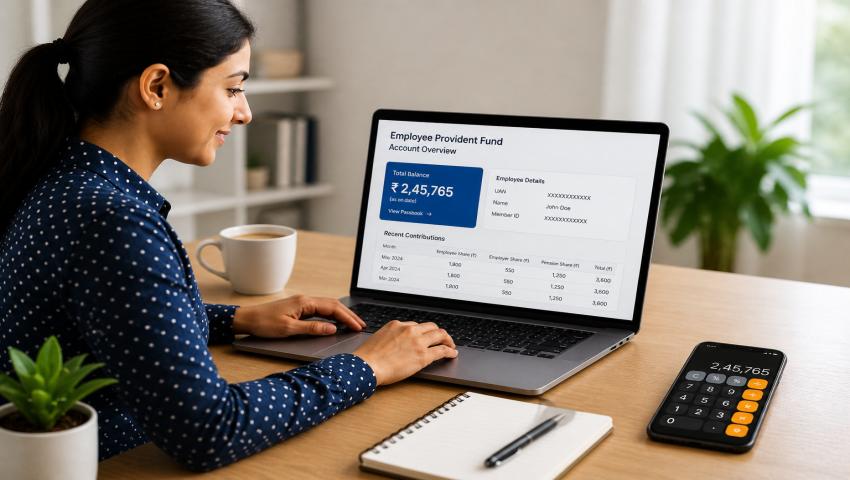
- Select your Member ID to see your epf passbook balance check.
My Finance Gyan suggests checking your passbook every month to ensure your employer is depositing the money on time.
Check PF Balance with UAN Number:
To check pf balance with uan number, you can use the Member e-Sewa portal. This is the central hub for all PF-related tasks.
- Step 1: Log in to the Member Interface of the Unified Portal.
- Step 2: On the dashboard, you can see your basic profile.
- Step 3: To see the total amount, navigate to the passbook section as mentioned above.
Using the uan number check pf balance method is the most detailed way. It shows you the employee share, the employer share, and the pension fund contribution separately.
EPF Balance Check by Missed Call:
Don’t have an internet connection? No problem. You can do a pf balance check missed call number search to find the official toll-free service. This is the fastest way for an epf balance check india.
- The Number: Give a missed call to 9966044425.
- The Process: The call will automatically disconnect after two rings.
- The Result: Within seconds, you will receive an SMS. This SMS will contain your total pf account balance check details and your last contribution.
This service is free of cost. It is a very helpful tool for people who do not use smartphones. Many users of My Finance Gyan prefer this method for a quick update.
How to Check EPF Balance by SMS?
Another offline method is the pf balance check by sms. This is very useful if the website is down or slow.
How to do it:
- Open your messaging app.
- Type EPFOHO UAN ENG (Replace “ENG” with the first three letters of your preferred language, like HIN for Hindi or MAR for Marathi).
- Send this message to 7738299899.
- You will receive a reply with your epfo check balance
This how to check pf balance by sms method works 24/7. It is perfect for a quick provident fund balance check online experience without actually going online.
Check PF Balance Without UAN:
Sometimes, employees forget their UAN or haven’t received it yet. You can still check pf balance without uan.
How to check pf balance using pf number:
- Visit the EPFO home page.
- Select ‘Click Here to Know Your EPF Balance’.
- Select your State and then the EPFO Office branch.
- Enter your PF Account Number (this is on your payslip).
- Enter your name and registered mobile number.
- Submit the details.
While this works, My Finance Gyan recommends finding your UAN as soon as possible. It makes all future tasks much easier.
How to Check EPF Balance Using UMANG App?
The Government of India launched the UMANG app to make life easier. It is a great way to check pf balance online india.
Steps for UMANG App:
- Download the UMANG app from the Play Store or App Store.
- Register and log in using your mobile number.
- Search for ‘EPFO’ in the app.
- Click on ‘Employee Centric Services’.
- Select ‘View Passbook’.
- Enter your UAN and get the OTP on your mobile.
- Enter the OTP and see your epfo balance check number data.
This is a very user-friendly method. You can also download your full passbook as a PDF file directly to your phone.
Common Issues While Checking PF Balance:
Sometimes, you might face trouble when you try to check epf balance. Here are some common problems:
- UAN Not Activated: If you just got your UAN, you must activate it and wait for 6 hours before you can see the balance.
- Mobile Number Mismatch: If your phone number has changed, the SMS and Missed Call services will not work.
- KYC Not Updated: If your Aadhaar is not linked, you might see errors on the portal.
- Server Down: The EPFO website often gets heavy traffic. If it doesn’t load, try again later at night or early in the morning.
Tips to Manage Your PF Account:
Managing your money is as important as earning it. My Finance Gyan recommends these simple tips:
- Check Regularly: Do an epf balance check with uan number at least once every three months.
- Update Nominee: Always ensure you have added a nominee to your PF account. This protects your family.
- Link Aadhaar: Ensure your UAN is Aadhaar-seeded to avoid issues during withdrawal.
- Don’t Withdraw Early: PF is meant for retirement. Try not to withdraw it unless it is an emergency.
- Merge Accounts: If you change jobs, transfer your old PF to the new one so your interest keeps growing.
Conclusion:
Knowing how to check pf balance is a vital skill for every working professional in India. Whether you choose the epf balance check missed call number or the UMANG app, staying updated helps you plan your financial future better.
My Finance Gyan aims to simplify finance for everyone. We hope this guide made your pf balance check by uan number process simple and easy. Keep tracking your savings and stay financially secure!
Need Help?
If you are facing any issues with your PF or need professional assistance, we are here for you. For any help related to PF registration, PF withdrawals, or PF balance checks, reach out to the experts.