- 08/08/2026
- Govind S. Jethani
- 304 Views
- 2 Likes
- GST
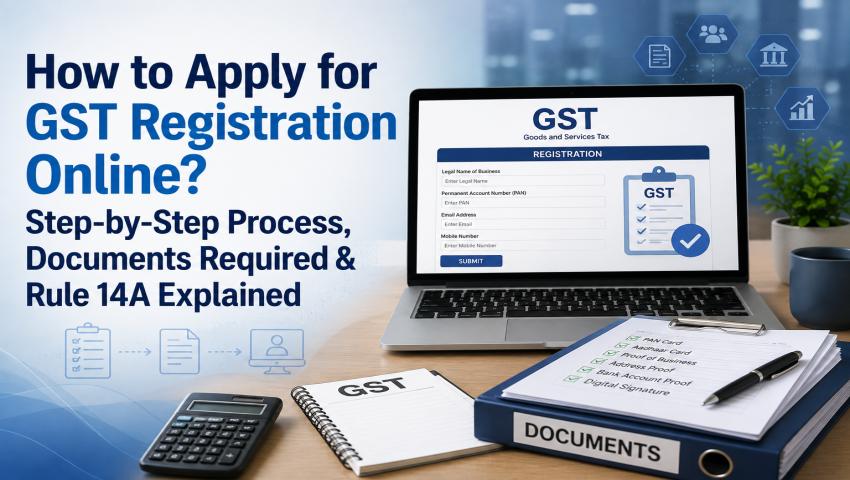
How to Apply for GST Registration Online? Step-by-Step Process, Documents Required & Rule 14A Explained
Starting a new business or crossing the GST turnover limit? One of the first things you may need to do is apply for GST registration.
At first, the GST registration form may seem confusing because it asks for details about your business, address, promoters, bank account, goods or services, and authorised signatory. However, if you keep all your documents ready and enter the correct information, the process becomes quite simple.
GST registration is done online through Form GST REG-01 on the official GST portal. In most cases, you don’t need to visit the GST office. However, depending on your case, you may have to complete Aadhaar authentication, biometric verification, submit additional documents, or undergo physical verification.
This guide By My Finance Gyan explains the complete GST registration process in simple words.
Who Needs GST Registration?
You should apply for GST registration if:
- Your business crosses the applicable GST turnover limit.
- GST registration is compulsory under GST law.
- You want to register voluntarily.
Many freelancers, consultants, traders, startups, and service providers voluntarily register so they can issue GST invoices and work with corporate clients.
Before applying, make sure you know:
- Whether GST registration is required for your business.
- The State where your business operates.
- The correct type of business (Proprietorship, Partnership, LLP, Company, etc.).
Remember:
- A Proprietorship uses the proprietor’s PAN.
- A Partnership Firm, LLP, or Company must use the PAN issued in the name of that business entity.
Documents Required for GST Registration:
The documents required depend on your business structure and the ownership of your business premises.
Basic Documents:
Keep these documents ready before starting the application:
- PAN Card
- Aadhaar Card of the proprietor, partners, directors, or authorised signatory
- Recent passport-size photograph
- Active mobile number
- Active email address
- Proof of business constitution
- Proof of business address
- Authorisation letter for the authorised signatory (if applicable)
- Details of goods or services supplied
- Bank account proof (where required)
Although bank account details are optional during the initial registration, they must be updated within the time prescribed under Rule 10A after GST registration is granted.
Documents Required for Different Business Types:
1. Proprietorship
Generally, you need:
- PAN of the proprietor
- Aadhaar Card
- Photograph
- Address proof
- Bank details (if available)
- Authorisation letter if someone else signs the application
The legal name should match the PAN, while the trade name can be your business name.
2. Partnership Firm
Usually, the following documents are required:
- PAN of the firm
- Partnership Deed
- PAN and Aadhaar of all partners
- Photographs of partners
- Business address proof
- Authorisation letter
- Bank account proof (if applicable)
Normally, the partnership deed is accepted as proof of constitution.
3. Limited Liability Partnership (LLP)
Documents generally include:
- PAN of the LLP
- Certificate of Incorporation
- LLP Agreement
- PAN and Aadhaar of Designated Partners
- Photographs
- Address proof
- Authorisation letter or resolution
- Digital Signature Certificate (DSC)
- Bank proof (if applicable)
Ensure that all details match the records available with the Ministry of Corporate Affairs (MCA).
4. Private Limited Company
Generally, you’ll need:
- PAN of the Company
- Certificate of Incorporation
- Memorandum & Articles of Association (MOA & AOA)
- PAN and Aadhaar of Directors
- Photographs
- Board Resolution or Authorisation Letter
- Digital Signature Certificate (DSC)
- Business address proof
- Bank proof (if applicable)
The registered office and GST business address can be different, but valid proof must be uploaded for the address entered in the application.
5. Trust, Society or Association
Documents generally required are:
- PAN of the entity
- Registration Certificate or Trust Deed
- PAN and Aadhaar of Trustees or Governing Members
- Photographs
- Address proof
- Authorisation Letter
- Bank proof (if applicable)
Address Proof for GST Registration:
Many GST applications are delayed because the address entered in the application does not match the uploaded documents.
1. If You Own the Property:
Upload any one of these:
- Electricity Bill
- Property Tax Receipt
- Water Bill
- Municipal Khata Copy
- Any other valid ownership document
2. If the Property is Rented:
Generally upload:
- Rent or Lease Agreement
- Landlord’s ownership proof (Electricity Bill, Property Tax Receipt, etc.)
If the rent agreement is registered, separate identity proof of the landlord is usually not required.
3. If the Property Belongs to a Family Member:
You can upload:
- Consent Letter or NOC
- Owner’s Identity Proof
- Electricity Bill or Property Ownership Proof
Step-by-Step GST Registration Process...
Step 1
Visit the GST Portal:
Go to the GST Portal and choose:
Services → Registration → New Registration
Step 2
Fill Part A of Form GST REG-01:
Enter:
- Type of Taxpayer
- State
- District
- Legal Name
- PAN
- Email ID
- Mobile Number
Verify your mobile number and email through OTP. After successful verification, you’ll receive a Temporary Reference Number (TRN).
Step 3
Open the Saved Application:
Return to the GST portal.
Select TRN, enter the number, verify the OTP, and continue filling Part B of the application.
Step 4
Enter Business Details:
Fill details like:
- Trade Name
- Constitution of Business
- Date of Business Commencement
- Reason for Registration
- Existing Registrations (if any)
Choose the correct reason for registration.
Step 5
Add Promoter or Partner Details:
Provide details of:
- Proprietor
- Partners
- Directors
- Designated Partners
- Trustees
- Karta
Make sure all information matches PAN and Aadhaar records.
Step 6
Add Authorised Signatory:
Choose the person who will sign GST returns and other GST documents. For proprietorships, it is usually the proprietor.
Companies and LLPs can authorise a director, employee, designated partner, or professional.
Step 7
Enter Business Address:
Fill in the complete business address including:
- Building Number
- Street
- Area
- City
- District
- State
- PIN Code
Also select the nature of possession:
- Owned
- Rented
- Leased
- Consent
- Shared
Upload the relevant address proof.
Step 8
Add Goods and Services:
Select the HSN Code for goods or SAC Code for services that correctly describe your business.
Avoid choosing incorrect codes.
Step 9
Complete Aadhaar Authentication:
Depending on your application, you may be required to complete:
- OTP-based Aadhaar Authentication
- Biometric Authentication
If Aadhaar authentication is not completed, the department may ask for physical verification or additional documents.
Step 10
Submit the Application:
Verify the declaration and submit the application using the permitted signing method.
Once submitted successfully, you’ll receive an Application Reference Number (ARN) which can be used to track your application.
What is Rule 14A?
Rule 14A is a simplified GST registration option introduced for certain eligible taxpayers. It is available if the estimated monthly GST payable on supplies made to registered businesses (B2B supplies) does not exceed ₹2.5 lakh, including:
- CGST
- SGST/UTGST
- IGST
- Compensation Cess
For example: A consultant provides services worth ₹10 lakh per month to registered companies. GST @18% = ₹1.80 lakh
Since the monthly GST liability is below ₹2.5 lakh, the consultant may be eligible to apply under Rule 14A if all other conditions are satisfied. To opt for Rule 14A, simply select “Yes” while filing Form GST REG-01. Rule 14A became effective from 1 November 2025 and is completely optional.
Can You Exit Rule 14A?
Yes.
If you later wish to move out of Rule 14A, you can apply online through Form GST REG-32.
Before applying for withdrawal, ensure:
- Required GST returns have been filed.
- Aadhaar authentication is completed.
Once approved through Form GST REG-33, the taxpayer can report higher B2B GST liability from the next month.
What Happens After Submitting the Application?
If everything is correct, GST registration is approved and a GST Registration Certificate (Form GST REG-06) is issued.
If additional information is required, the officer may issue Form GST REG-03. The applicant must reply through Form GST REG-04 within 7 working days. Failure to respond may lead to rejection through Form GST REG-05.
Frequently Asked Questions (FAQs):
Yes. The Government does not charge any fee for GST registration on the official GST portal. However, professionals may charge service fees for assistance.
A complete application is usually processed within the prescribed timeline. If clarification, Aadhaar verification, or physical verification is required, it may take longer.
Yes. A residential address can be used if valid address proof is available.
No. Bank details are optional during registration but must be updated later within the time prescribed under Rule 10A.
No. It is based on the monthly GST payable on B2B supplies, not on total turnover.
You should not collect GST or issue a GST tax invoice until your GST registration is approved and your GSTIN is allotted.
Conclusion:
Applying for GST registration is much easier when your documents are ready and all the information entered in the application matches your records.
Before submitting the form, carefully check your legal name, PAN, address, and uploaded documents to avoid unnecessary notices or delays.
If you are eligible, Rule 14A offers a faster registration process. However, choose this option only after understanding its conditions and ensuring that your expected monthly B2B GST liability falls within the prescribed limit.
A little preparation before applying can save you time and help you get your GST registration without unnecessary complications.
Disclaimer:
The views expressed in this article are personal to the author and are intended only for educational and awareness purposes. This article should not be treated as legal, tax, or professional advice, nor does it recommend any product or service. Readers should consult a qualified professional before making decisions based on their specific circumstances.