- 06/08/2026
- Govind S. Jethani
- 330 Views
- 2 Likes
- Tax
AIS vs Form 26AS: What Is the Difference and Which One Should You Check?
Before filing an income-tax return, most taxpayers check their Form 16, bank statements, investment records and tax-payment details.
Two more documents are also important:
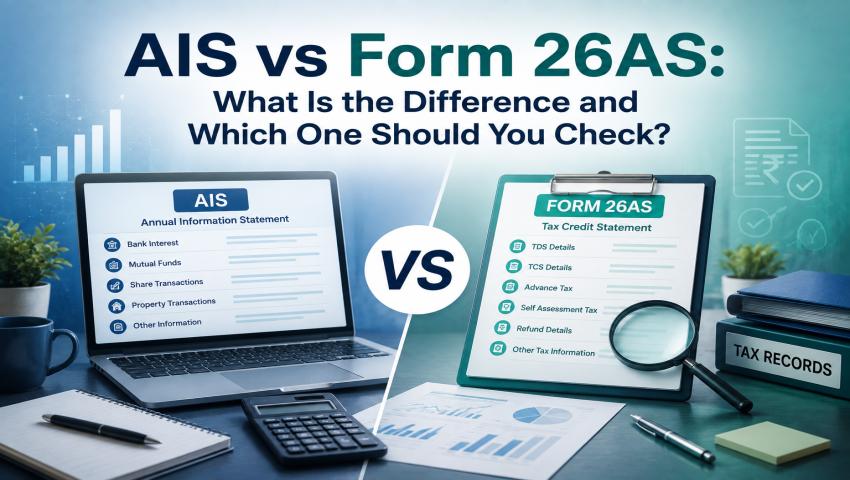
- Annual Information Statement, or AIS
- Form 26AS
Both are linked to your PAN, but they provide different information. Form 26AS mainly helps you check whether TDS or TCS has been correctly reported against your PAN.
AIS gives a wider view of your income and financial transactions reported to the Income Tax Department. You should normally check both before filing your ITR. Checking only one may lead to missed income, incorrect tax credit or a mismatch with the department’s records. In this My Finance Gyan guide, we explain the key differences between AIS vs Form 26AS so you know exactly which statement to rely on.
What Is Form 26AS?
Form 26AS is an annual tax statement linked to your PAN. From Assessment Year 2023-24 onwards, Form 26AS available through the TRACES portal mainly shows:
- Tax Deducted at Source, or TDS
- Tax Collected at Source, or TCS
Other income and financial transaction details are generally shown separately in AIS.
Form 26AS helps you confirm whether tax deducted or collected by your employer, bank, tenant, property buyer or another person has been correctly reported against your PAN.
Example:
Suppose your employer deducted ₹65,000 as TDS from your salary. The TDS amount shown in Form 16 should normally match the amount appearing in Form 26AS.
If your employer deducted the tax but did not report it correctly, you may not receive the proper tax credit while filing your return. The employer may need to correct the TDS return.
What Is AIS?
AIS stands for Annual Information Statement. It gives a wider summary of income and financial transactions reported to the Income Tax Department for a particular year.
AIS may include information relating to:
- TDS and TCS
- Salary income
- Bank and deposit interest
- Dividend income
- Purchase and sale of shares
- Mutual fund transactions
- Property transactions
- Foreign remittances
- Tax payments
- Income-tax refunds
- Specified Financial Transactions
- GST-related information
- Information received from foreign authorities
AIS may also show income on which no tax was deducted.
Example:
Suppose your bank reports interest income of ₹40,000, but no TDS was deducted.
The ₹40,000 may still appear in AIS. You must consider this interest while preparing your return, even though no tax was deducted.
AIS may not contain every transaction related to you. You are still responsible for reporting your complete and correct income, even when some information is missing from AIS.
What Is TIS?
TIS stands for Taxpayer Information Summary. It is available within the AIS system and provides a category-wise summary of information such as:
- Salary
- Interest
- Dividend
- Securities transactions
- Other reported income
TIS generally shows:
- The value reported by the source
- The value processed by the Income Tax Department’s system
- The value accepted by the taxpayer or confirmed by the reporting source
Where applicable, the accepted or confirmed amount may be used to pre-fill your income-tax return.
TIS is useful for a quick review. However, you should open the detailed AIS when any amount looks incorrect or unusual.
Main Difference : AIS vs Form 26AS
The main difference is simple:
Form 26AS is mainly used to check tax credit. AIS is mainly used to check reported income and financial transactions.
Suppose your records show:
- Salary income: ₹9 lakh
- Bank interest: ₹60,000
- Dividend income: ₹25,000
- Mutual fund sale value: ₹2 lakh
- TDS: ₹75,000
Form 26AS may mainly help you confirm whether the TDS of ₹75,000 has been correctly reported. AIS may show the salary, interest, dividend, mutual fund transaction and tax-related information reported by different organisations.
AIS also allows you to give feedback when the information is incorrect, duplicated or belongs to another person. Form 26AS does not provide the same transaction-level feedback facility.
Which Statement Should You Use While Filing an ITR?
You should check both AIS and Form 26AS. You should also compare them with your own financial records.
Use Form 26AS to verify:
- TDS credit
- TCS credit
- Tax payment details
Use AIS to review:
- Income reported against your PAN
- Financial transactions
- Property transactions
- Investment transactions
- Other information available with the department
AIS and Form 26AS should not replace your original documents, such as:
- Form 16 and Form 16A
- Bank statements
- Interest certificates
- Broker capital-gain statements
- Mutual fund statements
- Property documents
- Books of account
- Tax-payment challans
Important Example:
Suppose AIS shows that shares worth ₹8 lakh were sold. You should not report ₹8 lakh as capital gain.
The actual taxable capital gain must be calculated after considering:
- Purchase cost
- Sale value
- Related expenses
- Holding period
- Applicable tax rules
AIS only reports transaction information. It does not always calculate your taxable income.
What Should You Do If AIS Contains Incorrect Information?
AIS allows you to submit feedback against a transaction.
You may indicate that:
- The information is correct
- The information is partly correct
- The transaction belongs to another PAN
- The transaction belongs to another financial year
- The information is duplicated
- The transaction is denied
- The income is not taxable
- The amount needs to be changed
After feedback is submitted, AIS may show both:
- The originally reported value
- The modified value
The reporting source may also be asked to confirm the correction. You will receive an acknowledgement after submitting feedback.
However, submitting AIS feedback does not mean you should automatically use the modified value in your return.
Keep proper supporting documents in case the Income Tax Department asks for an explanation later.
What Should You Do If Form 26AS Does Not Show TDS?
Suppose your bank deducted ₹10,000 as TDS, but the amount does not appear in Form 26AS. First, check your TDS certificate and confirm that your PAN is correct.
Then contact the bank or deductor and ask them to correct or revise their TDS statement. A taxpayer usually cannot directly add missing TDS to Form 26AS. The deductor must correct the reporting.
A mismatch between the tax credit claimed in the ITR and the credit shown in Form 26AS may:
- Delay return processing
- Result in lower tax credit
- Create a tax demand
- Require further correction
The income-tax portal compares the TDS, TCS and tax-payment details claimed in the return with the information available in Form 26AS.
How to Access AIS?
Follow these steps:
- Log in to the income-tax e-filing portal.
- Select the AIS option from the dashboard.
You may also go to:
e-File > Income Tax Return > View AIS
- Select the required financial year.
- Open AIS or TIS.
- Download the statement if required.
AIS is generally available in:
- PDF format
- CSV format
- JSON format
How to Access Form 26AS?
Follow these steps:
- Log in to the income-tax e-filing portal.
- Go to:
e-File > Income Tax Returns > View Form 26AS
- Confirm the redirection to the TRACES portal.
- Select the required assessment year.
- View or download Form 26AS.
AIS and Form 26AS Under the Income-tax Act, 2025:
The Income-tax Act, 2025 applies from Tax Year 2026-27 onwards. Under the Income-tax Act, 1961, the Annual Information Statement was covered by Section 285BB read with Rule 114-I.
Under the Income-tax Act, 2025, the corresponding provision is Section 510. This section allows the prescribed income-tax authority to upload an annual information statement to the taxpayer’s registered account.
Under the Income-tax Rules, 2026, the relevant provision is Rule 245. The prescribed annual information statement continues to be identified as Form 26AS under the new rules.
Therefore, the form number has not automatically changed because the new Income-tax Act has come into force.
Important Transition Period:
Income earned during FY 2025-26 will be reported in AY 2026-27 under the Income-tax Act, 1961. Income earned during Tax Year 2026-27 will be reported under the Income-tax Act, 2025 after the tax year ends.
Returns for AY 2026-27 will continue to use ITR-1 to ITR-7 under the old law. New ITR forms under the Income-tax Rules, 2026 are expected to apply to returns for Tax Year 2026-27.
Common Mistakes to Avoid:
1. Treating Every AIS Amount as Taxable Income:
Not every amount shown in AIS is taxable income.
For example:
- Share sale value is not the same as capital gain
- Property sale value is not the same as taxable profit
- Mutual fund redemption value is not the same as capital gain
The taxable amount must be calculated separately.
2. Ignoring Income Missing From AIS:
Income does not become tax-free simply because it does not appear in AIS. You must report all taxable income based on your own records.
3. Claiming TDS Without Checking Form 26AS:
Some taxpayers claim TDS based only on Form 16 or Form 16A. Always confirm whether the tax credit appears in Form 26AS.
4. Not Comparing Statements With Personal Records:
Differences between AIS, Form 26AS and your own records should be checked before filing the return. A simple reconciliation can prevent tax notices, processing delays and incorrect tax demands.
Frequently Asked Questions:
No.
Form 26AS mainly shows TDS and TCS information. AIS contains a wider range of income and financial transaction details.
TIS is a summary available within the AIS system. It provides category-wise totals of reported information.
No.
You should use AIS along with Form 26AS, Form 16, bank statements, investment reports and other supporting documents.
Not necessarily.
Incorrect or missing TDS in Form 26AS usually needs to be corrected by the deductor through a revised TDS statement.
Check Form 26AS to confirm whether the TDS credit has been properly reported against your PAN.
Check AIS to review salary, interest, dividends, investment transactions, property transactions and other information reported against your PAN.
Under the Income-tax Rules, 2026, the prescribed Annual Information Statement continues as Form 26AS. Its legal basis under the new law is Section 510 read with Rule 245.
Conclusion:
Form 26AS helps you check whether TDS and TCS deducted or collected against your PAN have been properly reported.
AIS helps you review the income and financial transactions reported to the Income Tax Department.
Before filing your ITR:
- Check Form 26AS for tax credit
- Check AIS for income and transaction details
- Compare both with your own records
- Correct any mismatch before filing, wherever possible
The Income-tax Act, 2025 changes some section and rule numbers, but Form 26AS continues under the new tax framework.
Disclaimer:
This article is for general educational purposes only. The correct tax treatment depends on the type of income, nature of the transaction and applicable tax year.
Professional advice should be taken when AIS or Form 26AS contains major errors, missing tax credits or high-value transactions.